Industrial Design Guide
How to Create a CMF Board for Product Design
Turn product renders, colors, materials, and finishes into one clear presentation—with a real reason behind every design choice.
By DesignCMF · · Practical guide
Start here
What is a CMF board?
A CMF board is a visual presentation of the Color, Material, and Finish choices for a product. It brings product imagery, palettes, material references, and surface notes into one place to explain a design direction—not simply to display a nice render.
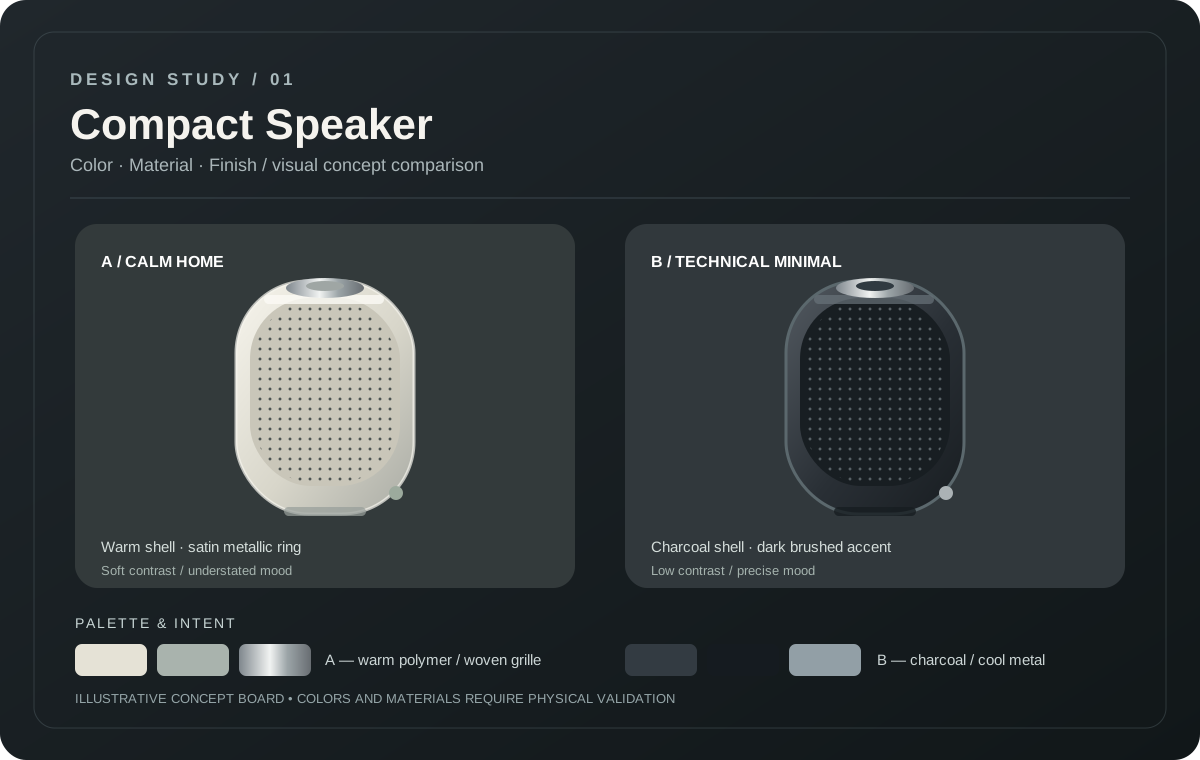
For example, a compact speaker in warm white with a woven grille creates a different impression from the same speaker in charcoal with a dark metallic ring. Showing both directions side by side can make those decisions easier to evaluate.
Essentials
The 6 things to include
A useful board should answer what the product looks like, which components use which finishes, and why those choices belong together.
Hero product render
Start with a clear image showing the form and key surfaces. Keep the viewing angle consistent when comparing design directions.
Focused color palette
Label the primary, secondary, and accent colors. Add HEX values for digital reference and verified physical standards when appropriate.
Material references
Name the intended materials for each important part, such as polymer housing, fabric grille, or metal trim. Label exploratory references clearly.
Surface finish
Show the intended matte, satin, brushed, glossy, or textured treatment. Include close-up details where the difference is subtle.
Design rationale
Explain what you want the product to communicate and why the choices suit the person using it.
Component annotations
Make it obvious which swatch or material belongs to which part. Short, clear labels beat decorative complexity.
Step by step
How to create a CMF board in 5 steps
- 1
Define your product's direction
Think about the user, context, and intended personality. Should the product feel calm, rugged, playful, or technical? Write down one clear direction.
- 2
Build a color palette
Choose a main color, a supporting tone, and any accents that serve a purpose. Apply them to the product to see how they work in context.
- 3
Explore materials and finishes
Consider how polymer, metal, fabric, or ceramic-inspired surfaces change the appearance. Compare matte and reflective finishes before choosing an idea to validate.
- 4
Organize comparable product images
Give one render visual priority and use smaller supporting images only when they explain details or meaningful alternatives. Keep lighting and perspective comparable.
- 5
Label, review, and export
Add material and color labels, write a short rationale, and check what remains unverified. Export the board to share during review.
Illustrated example
One speaker, two CMF directions
The form remains conceptually the same, but the colors and surface appearances change its character. This original illustration demonstrates a comparison layout; it is not a tested product specification or an AI generation claim.
Direction A
Calm Home
Warm white shell, light woven grille, satin silver ring, and a subdued accent. A friendly visual direction for the home.
Direction B
Technical Minimal
Charcoal housing, dark grille, and cool metallic trim. A quieter, more technical visual direction.
Layout anatomy
Give every element a clear job
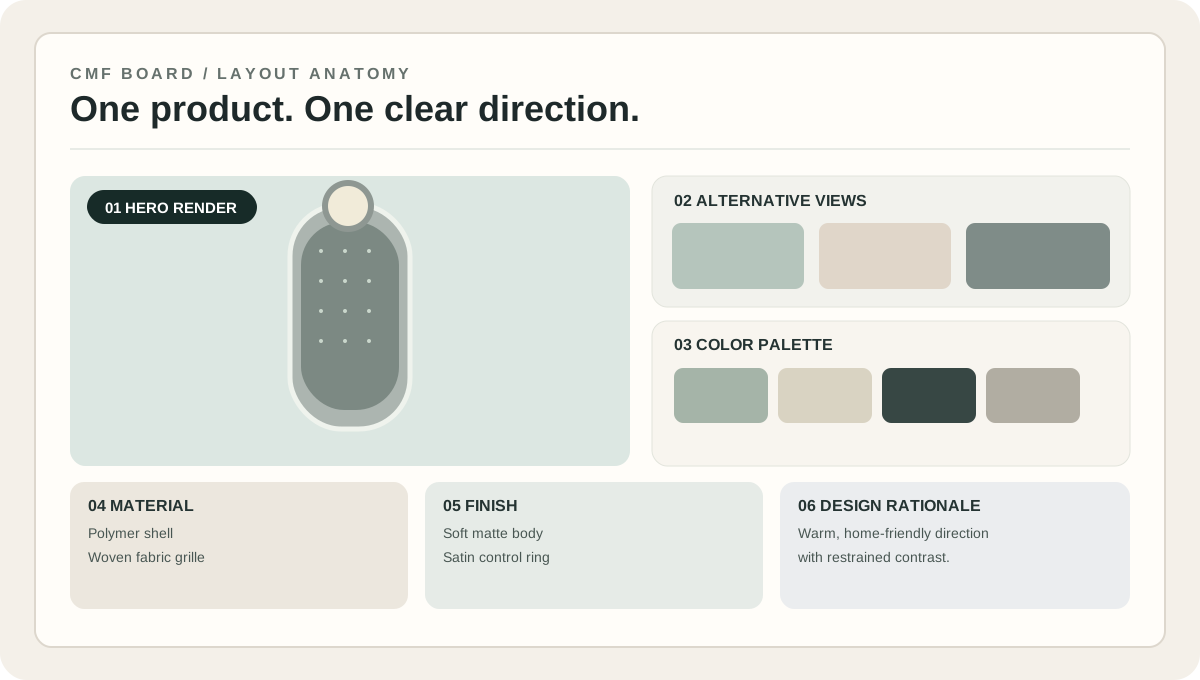
Give one hero image the most space. Support it with smaller views, color swatches, materials, finishes, and a short design statement. Avoid overcrowding the board with similar-looking alternatives.
Surface character
Material and finish are different decisions
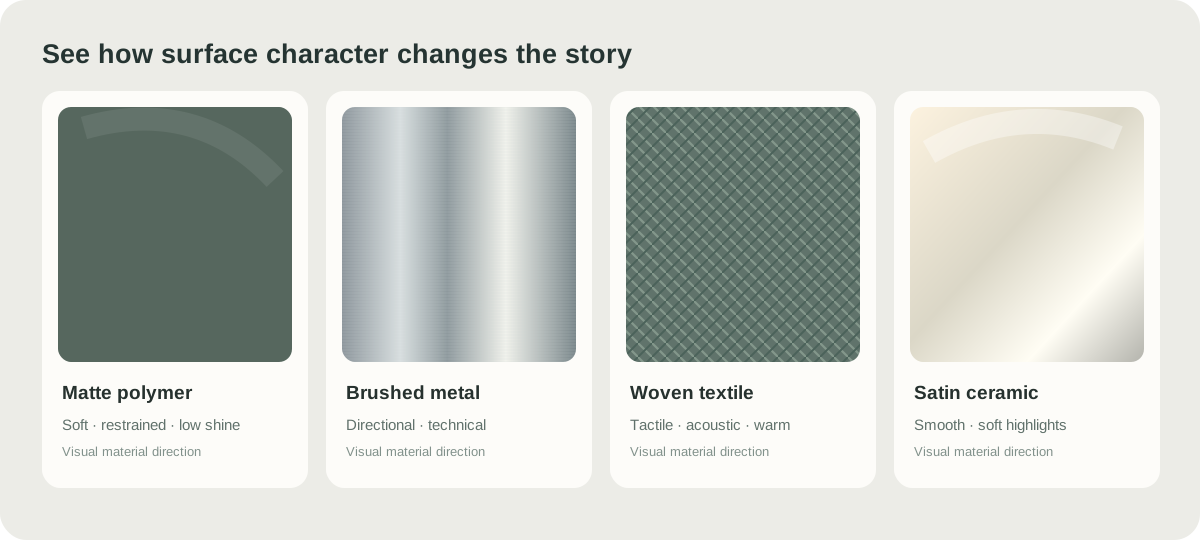
The material describes what a part is intended to be made from. Its finish describes the surface treatment or visible texture. Similar colors can feel very different when shown as matte polymer, brushed metal, textile, or satin ceramic.
Quality check
Five common mistakes to avoid
Too many unrelated colors
A crowded palette makes the direction harder to understand. Use colors that each have a clear role.
Material samples with no product context
A texture may look impressive alone but not work visually on the product. Apply the idea to a real component.
Different lighting across variations
Changing the shadows or camera angle can make a colorway look better for the wrong reason. Keep comparisons controlled.
Unverified color and material claims
A digital HEX value does not establish an exact physical color, and an image cannot prove a material grade or production finish.
No design rationale
Say why the choices matter. A good board explains an intended product character, not just a set of swatches.
From concept to reality
Digital boards vs. physical samples
Digital CMF board
Useful for exploring aesthetic directions, comparing concepts, and presenting design intent before physical samples exist.
Physical validation
Needed to confirm real color, tactile texture, gloss, durability, supplier availability, and production feasibility.
A digital board communicates the concept. Physical samples and engineering specifications confirm what can actually be produced.
Put it into practice
Turn your concept versions into a presentation
DesignCMF Studio lets you explore product concepts, keep project versions, and assemble a CMF presentation board. You can edit color, material, and finish labels and export a PNG. Always verify the labels; they are not automatically validated material specifications.
The Studio requires sign-in; AI generations use credits. Board exports are concept presentations, not manufacturing approvals.
FAQ
Frequently asked questions
What does CMF stand for in product design?
CMF stands for Color, Material, and Finish. These decisions affect the product's appearance, surface quality, and intended tactile experience.
What is the purpose of a CMF board?
A CMF board combines proposed colors, materials, finishes, and product visuals so people can compare directions and understand the design intent.
How do I create a CMF board?
Choose a clear product image, develop a palette, select material and finish references, label the parts, and arrange the elements around a short concept statement.
What should I include in a CMF board?
Include a hero render, supporting views where useful, color swatches, material references, finish descriptions, component labels, and a clear design rationale.
Do I need a 3D model to make a CMF board?
No. Early boards can use product photographs or 2D concept renders. 3D models are helpful for consistent visualization but not required for the first presentation.
Can I use AI-generated product images?
Yes, for early visual exploration. Check generated images for invented seams, missing parts, changed proportions, and lighting differences. Do not treat them as validated specifications.
What is the difference between a CMF board and a mood board?
A mood board communicates inspiration or visual atmosphere. A CMF board connects specific color, material, and finish choices to parts of a particular product.
How many colors belong on a CMF board?
There is no fixed number. A primary color, one supporting color, and a few accents are often enough; use only the colors necessary to explain the product.
Should I include HEX, Pantone, or RAL references?
HEX values work for digital previews. Use independently verified Pantone, RAL, or other physical color standards when needed. A HEX value is not an exact physical color match.
How can I present finishes such as matte or brushed?
Use labeled texture references, close-up images, and comparable product renders. Physical samples are needed to confirm gloss, texture, and feel.
Can I compare several CMF directions on one board?
Yes. Clearly separate them and use similar angles and lighting. If each direction needs extensive detail, consider a separate board for each one.
Is a CMF board a manufacturing specification?
No. A concept board communicates visual intent. Manufacturing requires approved materials, measured colors, surface treatments, tolerances, and supplier or testing information.
Can I include CMF boards in my design portfolio?
Yes. They are useful for explaining why you selected certain colors and surface treatments. Note what was exploratory and what was physically validated.
Can DesignCMF export a CMF presentation board?
DesignCMF Studio includes a board for existing project versions, editable color, material, and finish labels, and PNG export. The browser print action is also available. Review all labels before sharing.
How can I make a CMF board look more professional?
Use consistent product views, a strong hierarchy, readable annotations, a restrained palette, and a concise rationale rather than decorative clutter.
What should happen after a CMF review?
Record the preferred direction and unresolved issues, then verify actual material, measured color, cost, durability, and production feasibility using physical samples and appropriate engineering work.
Next step
Make the next design decision easier.
Start with your product concept, explore colors and surface appearances, and share a clearly explained CMF direction.